
Unsubscriber

My reason for upgrading was really the state of my gmail inbox. I have never done anything to manage it before other than use Google’s Important category so I have 1000s of unread emails. I quickly found that to do what I wanted to do I had to upgrade. Further I have 5 e-mail addresses I want to manage in an integrated fashion. So far I am happy with Clean Email’s functionality.

WSJ

Martyn Cooper

"If you use a bulk unsubscribe email service, make sure you are using a safe service. Some free services could collect and sell your data. If you are willing to pay for such a service, Clean Email is safe and does not sell their user’s data."

WSJ

Bryan Robinson, Ph.D. • Forbes

"Clean Email is a tool to remove junk emails from your inbox. You can easily unsubscribe from mailing lists that you’re not interested in or have accidentally signed up for."

WSJ

Joe Brown • MakeUseOf

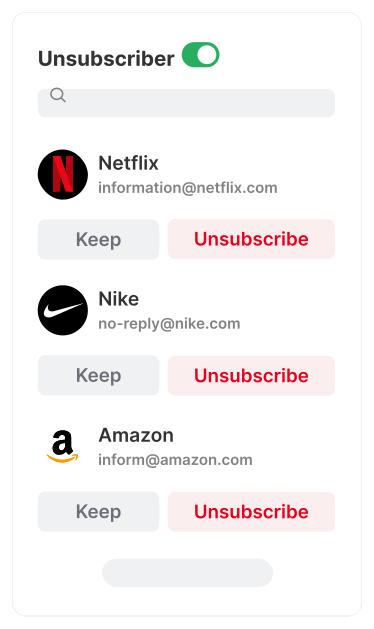
Keep, Unsubscribe, Read Later

Dive into a clutter-free inbox experience. Choose which emails you would like to keep, from which to unsubscribe, and those to temporarily pause, or roll up and read them later.

All Subscriptions in One Place

All your newsletters and subscriptions are gathered in a single view for advanced subscription management. Make quick decisions on the spot—keep, unsubscribe, pause, move to a specific folder, keep the latest email from the sender, and more.

Bulk Unsubscribe Power

Declutter your inbox swiftly. Whether it's one or a hundred, unsubscribe from existing and new emails in a single click with Clean Email.

We take the extra step to send unsubscription requests on your behalf. If these requests aren't honored, Clean Email ensures the sender is blocked, keeping your inbox undisturbed.

Want a Break? Pause

Not ready to fully unsubscribe? Use the Pause feature to temporarily halt newsletters from appearing in your inbox. Resume whenever you choose, ensuring you stay connected without the clutter. Ideal for taking short breaks without completely cutting off.

Read Later

Not every email demands immediate attention. Our "Read Later" feature lets you continue receiving your favorite newsletters and subscriptions without them clogging your inbox.

Deliver them to "Read Later," and get a consolidated digest whenever you prefer, be it weekly or at a time of your choosing. It's ideal for unhurried "Sunday reading" or quick breaks.

Privacy First:
We Value Your Data

Unlike free services that monetize your personal information, your privacy is sacrosanct to us. Choose Clean Email for secure email management at a fair price. 1,000 free cleanups + 14-day trial of advanced features. No credit card needed.

Privacy

Clean Email in Press

"Of the handful [of mailbox-management apps] I tested, I liked Clean Email best. Before using Clean Email, I had 17,677 unread emails. Now, it’s a fraction of that."

Nicole Nguyen • WSJ

"If you use a bulk unsubscribe email service, make sure you are using a safe service. Some free services could collect and sell your data. If you are willing to pay for such a service, Clean Email is safe and does not sell their user’s data."

Bryan Robinson, Ph.D. • Forbes

"Clean Email is a tool to remove junk emails from your inbox. You can easily unsubscribe from mailing lists that you’re not interested in or have accidentally signed up for."

Joe Brown • MakeUseOf

"Clean Email looks like a good choice: They don’t have to sell your personal email data because they charge an honest price for their service."

John Gruber • Daring Fireball

"You can have Clean Email archive, trash or label emails, and do so with any other messages that match this criterion in the future. I’ve never had an easier time clearing out entire gigabytes’ worth of email until now."

Abhimanyu Ghoshal • TNW

Paper PlaneIcon

Start Cleaning Email Today

Star Rating4.5stars based on 3300 user reviews

Cut through the clutter and focus on your most important emails.